

With host registration out of the way, face verification is your next milestone. It’s a short, uncomplicated process, but it’s one every host must finish before streaming for the first time or requesting a withdrawal. Here’s a full walkthrough of how Poppo Live face verification works, along with solutions to the most common hiccups you might run into.
How to Complete Poppo Live Face Verification
Step 1: Head to the Homepage
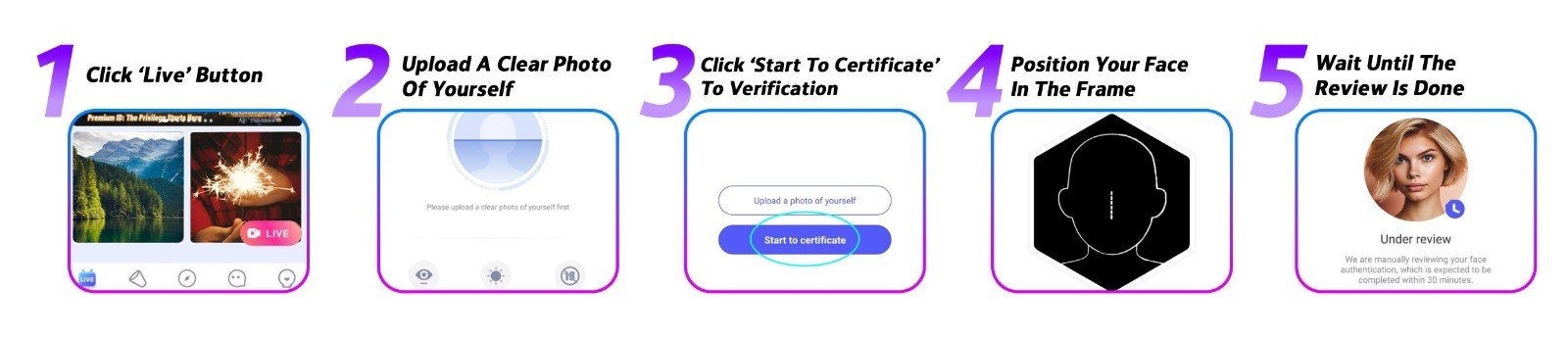
Open Poppo Live and go to the homepage. Tap the ‘Live’ button to be directed to the face verification section where everything will happen.
Step 2: Upload Your Photo
The first thing you’ll do is submit a photo of yourself. It should be recent, clearly lit, and show your face without obstruction. Once you’re happy with it, tap ‘Confirm’ to move on.
Step 3: Start the Verification
Tap ‘Start to Certificate’ to kick off the live verification stage. Before you do, make sure you’re somewhere with good lighting and no distractions.
Step 4: Follow the On-Screen Prompts
The app walks you through each step as it happens. For the best results: sit in a well-lit space without a strong backlight, take off any hats, glasses, masks, or anything covering your face, and use your front-facing camera in a clear environment.
Step 5: Submit and Await Your Result
Once all steps are done, submit your verification. Results typically come back within one to three business days. A successful review means your host account is officially verified. If it doesn’t go through, you can simply start the process over.
Common Face Verification Problems & Solutions
- Camera access isn’t working
Check that Poppo Live has been granted camera permissions in your device settings, and make sure the app is fully up to date. If that doesn’t fix it, restart your phone or try on a different device. - Still under review
Most verifications wrap up in a matter of minutes, though some may take up to three business days when manual review is needed. If you’ve been waiting longer than that, contact our team and we’ll look into it. - Verification was rejected
A mismatch between your submitted video and your profile photo is the most common cause, as is having another person visible in the frame. Update your profile photo if needed and give it another go.
Poppo Live Face Verification FAQs
- What if I skip face verification?
Without completing it, you won’t be able to go live or access your earnings. It’s a non-negotiable requirement for all Poppo Live hosts. - Can I redo the video verification steps?
Absolutely, you can repeat the steps as many times as you need. There’s no limit or penalty for retrying the steps. - Why does the app ask me to re-verify periodically?
This is a routine security measure built into the platform to protect your account. Complete it when prompted to keep your account in good standing. - What do I do if my verification keeps failing?
You can retry multiple times per day. If you hit the daily cap, wait 24 hours and try again. Persistent issues? Get in touch with our support team for direct assistance.
Can’t Stream Without It
Face verification is a small task with a big impact, skip it, and you can’t stream or withdraw. Get it done early and you’ll be set up for a smooth start on Poppo Live. The whole thing takes just a few minutes, and this guide has everything you need to get through it. Still have questions? Our team is always happy to help, reach out or visit our blog for more.