

As a Poppo Live agent, your earning power is directly tied to the hosts on your roster. The more talented streamers you bring in, the stronger your income becomes, which makes knowing how to send host invitations one of the most practical skills in your toolkit. The process itself is refreshingly simple. So, here’s a full breakdown of how Poppo Live invite new host process works.
Poppo Live Invite New Host Tutorial
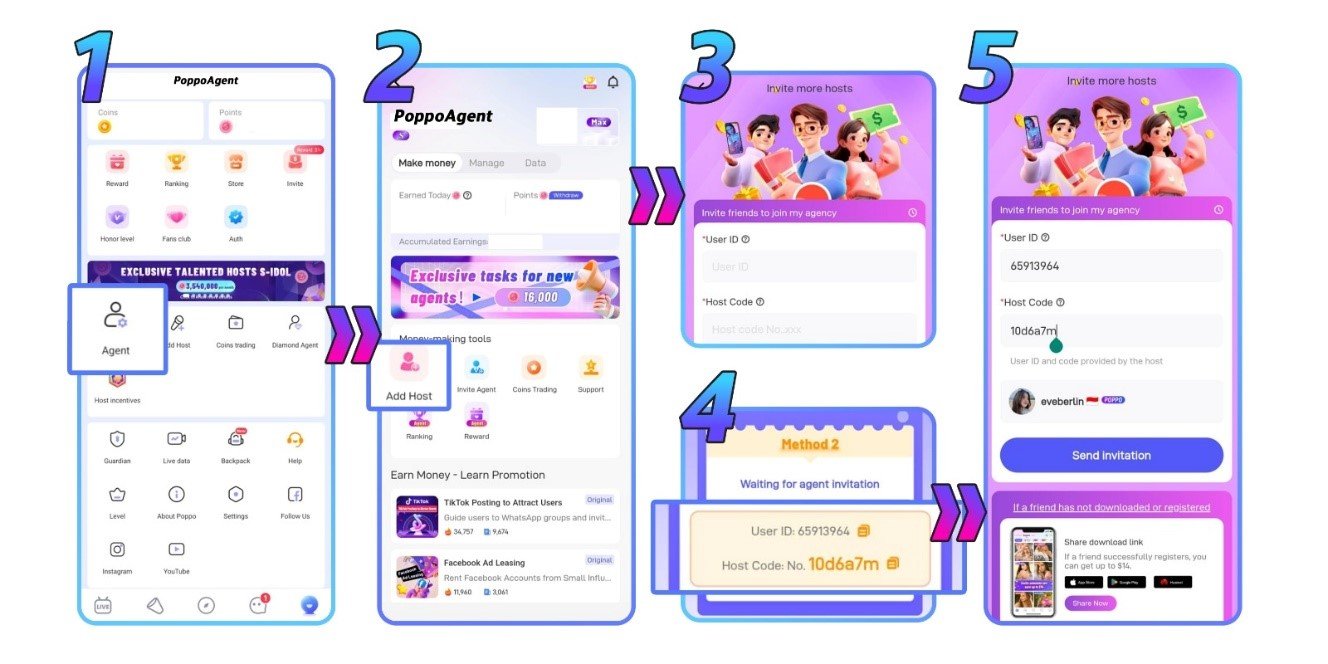
Step 1: Go to Your ‘Agent’ Menu
First, open your profile and find the ‘Agent’ menu in the center of the screen. Tap it to get started.
Step 2: Select ‘Add Host’
Next, inside the ‘Agent’ menu, tap the ‘Add Host’ button located at the center of the screen.
Step 3: Get the Host’s Details
Before filling anything in, you’ll need to collect the host’s ID and code directly from them. Once you have both, enter them into the appropriate fields.
Step 4: Host’s ID and Code Examples from the Host
Look at the example below of how the ID and code supposed to look like
Step 5: Send the Invite
With the host’s ID and code in place, tap ‘Send Invitation’ to deliver the invite to their Poppo Live account.
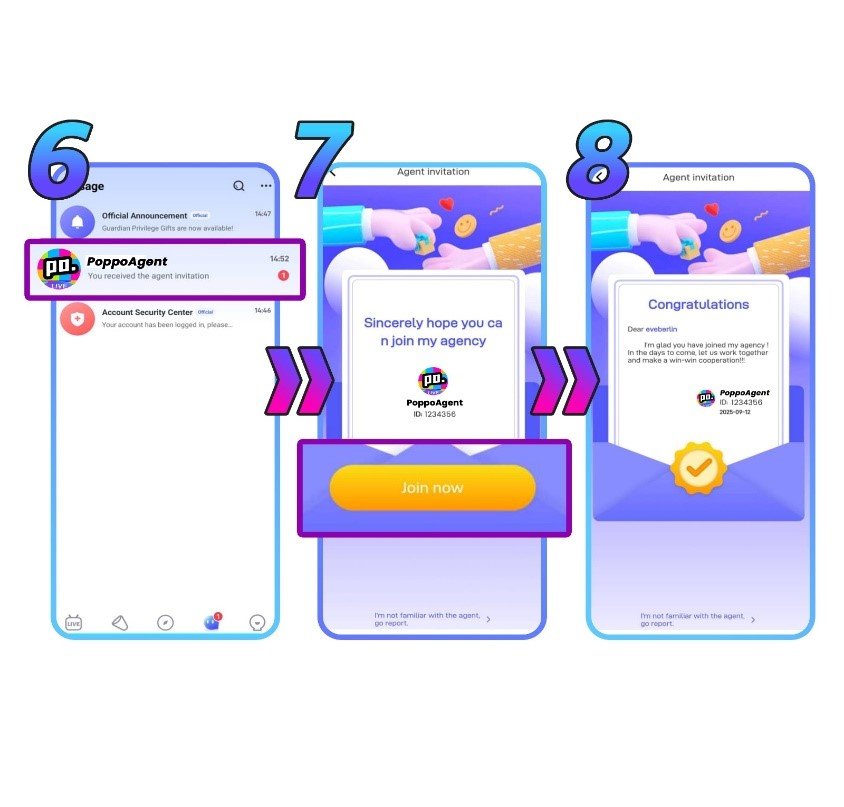
Step 6: The Host Gets Notified
Then, the host will receive a notification and invitation message directly inside their Poppo Live app.
Step 7: They Accept or Decline
The ball is in their court. The host can choose to accept your invitation or pass on it.
Step 8: They’re In!
Lastly, if they accept, they’re now an official member of your agency. Time to start growing together on Poppo Live.
Common Host Invitation Problems & Solutions
- The host couldn’t join after I sent the invite
There are two likely explanations: the ID or code was entered with a typo, or the host is already part of another agency. Confirm the details with the host and try sending the invitation again. - I want to invite a host who’s in a different agency
You’ll have to wait this one out. A host must formally exit their current agency before you’re able to bring them into yours.
Poppo Live Invite New Host FAQs
- Are there performance requirements for agents?
Yes. Poppo Live has activity-based targets that cover both your own recruitment efforts and your team’s overall engagement. If your entire roster, hosts and sub-agents alike, goes inactive for a full month, your agency could be shut down and your members reassigned to the platform’s official agency. These requirements can be updated, so contact our team to get the current details. - What if I don’t have the host’s ID or code yet?
- You’ll need both before the invitation can be sent. Reach out to the host first and get their details before opening the form.
Your Growth is Your Team
In conclusion, that’s everything you need to know about bringing hosts into your Poppo Live agency. So, remember, your growth as an agent is a direct reflection of the team you build, so be proactive about reaching out and recruiting. Questions about the process or anything else on the platform? Our team is ready to help anytime. You can also visit our blog for more guides and tips.