
If you’ve already gone through the host registration process, you’ll know that Poppo Live has two ways to earn on the platform. For those who’d rather work behind the scenes than in front of a camera, becoming a Poppo Live agent is the ideal alternative. Agents focus on what they do best, finding talented people and building a team, and those skills are exactly what drive success in this role. Before diving in, let’s cover the Poppo Live agency registration requirements you’ll need to have ready.
Poppo Live Agency Registration Guide
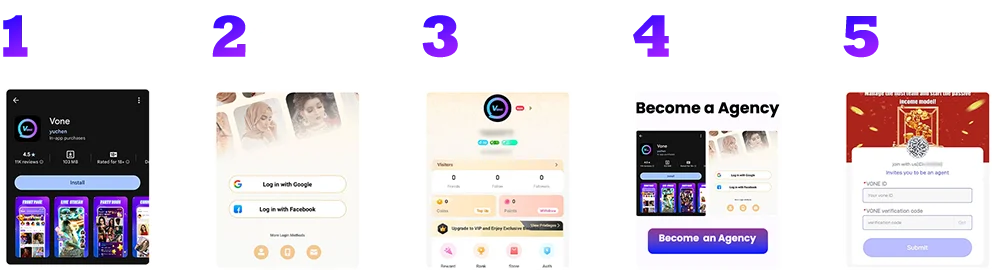
Step 1: Download the App
Tap the download link on this page to install Poppo Live on your device. Once the app is installed, go ahead and open it.
Step 2: Create Your Account
When the app opens, you’ll be prompted to set up an account. Choose from Google, Facebook, Instagram, email, or phone number, whichever is easiest for you.
Step 3: Locate and Copy Your Account ID
Head to your profile after registering and look just below your profile photo. You’ll see your unique account ID there, copy it carefully, as you’ll need it shortly.
Step 4: Open the Agency Registration Link
Use the registration link on this page to access the agency application form.
Step 5: Send in Your Registration Request
Paste your account ID into the form and click ‘Get’ to receive a verification code. The code will arrive in your Poppo Live inbox under the ‘System Message’ tab. Enter both your ID and the code, then click ‘Submit’ to complete your agency registration.
Problems & Solutions During Agency Registration
- Not getting the verification code
The most likely reason is a mistyped account ID. Go back and confirm your ID is copied correctly. If it is and you’re still not receiving the code, try connecting to a different network and attempt it again after a brief wait. - Registration link not loading
First, confirm you’re using the right link from this page. If you have an ad blocker running, try disabling it. If the issue continues, try again after some time.
Poppo Live Agency Registration FAQs
- What do I earn as a Poppo Live agent?
Agents earn commissions from gifts, their hosts’ income, and any sub-agents they manage — multiple income streams that grow as your team grows. - Can I manage more than one agency?
No Poppo Live allows only one agency per person. - Wrong username entered during sign-up?
You can fix this anytime by updating your username through your profile settings. - Registered with the wrong gender or country?
These information can’t be edited after registration. You’ll need to create a fresh account with the correct details. - Can a host move to a different agency?
Yes, though they’ll need to formally request to leave their current agency and receive approval before making the switch. - Can agents go live on the app?
Yes, being an agent doesn’t stop you from streaming. All Poppo Live agents can go live whenever they want.
Start Building Your Team
Registering as a Poppo Live agent is a fast and painless process. Once you’re set up, you’ll have everything you need to start building your team, learning the platform, and exploring all the ways agents can earn. Have questions? Our support team is always available, reach out anytime or check our blog for more tips and guides.