
Every hour you spend going live or managing your agency on Poppo Live should lead to a smooth, hassle-free payout. So, this guide walks you through the full Poppo Live withdrawal process, from the requirements you’ll need to meet beforehand, to the step-by-step instructions, frequently asked questions, and solutions to the most common issues hosts and agents run into.
Withdrawal Requirements
Face Verification. Both hosts and agents must have face verification completed before making a withdrawal. Hosts need it done before their first stream; agents need it before their first payout.
Verified Contact Details. An email address or phone number must be linked to your Poppo Live account. Moreover, head to your profile to make sure your details are bound to the app before you proceed.
Minimum Balance of $10 USD. Next, your earnings need to reach at least $10 USD before doing a withdrawal.
Active Payment Account. Withdrawals are processed through bank transfer or e-wallet. Whichever you use, make sure the account is active. Furthermore, the full list of supported options is covered further in this guide.
Poppo Live Withdrawal Guide
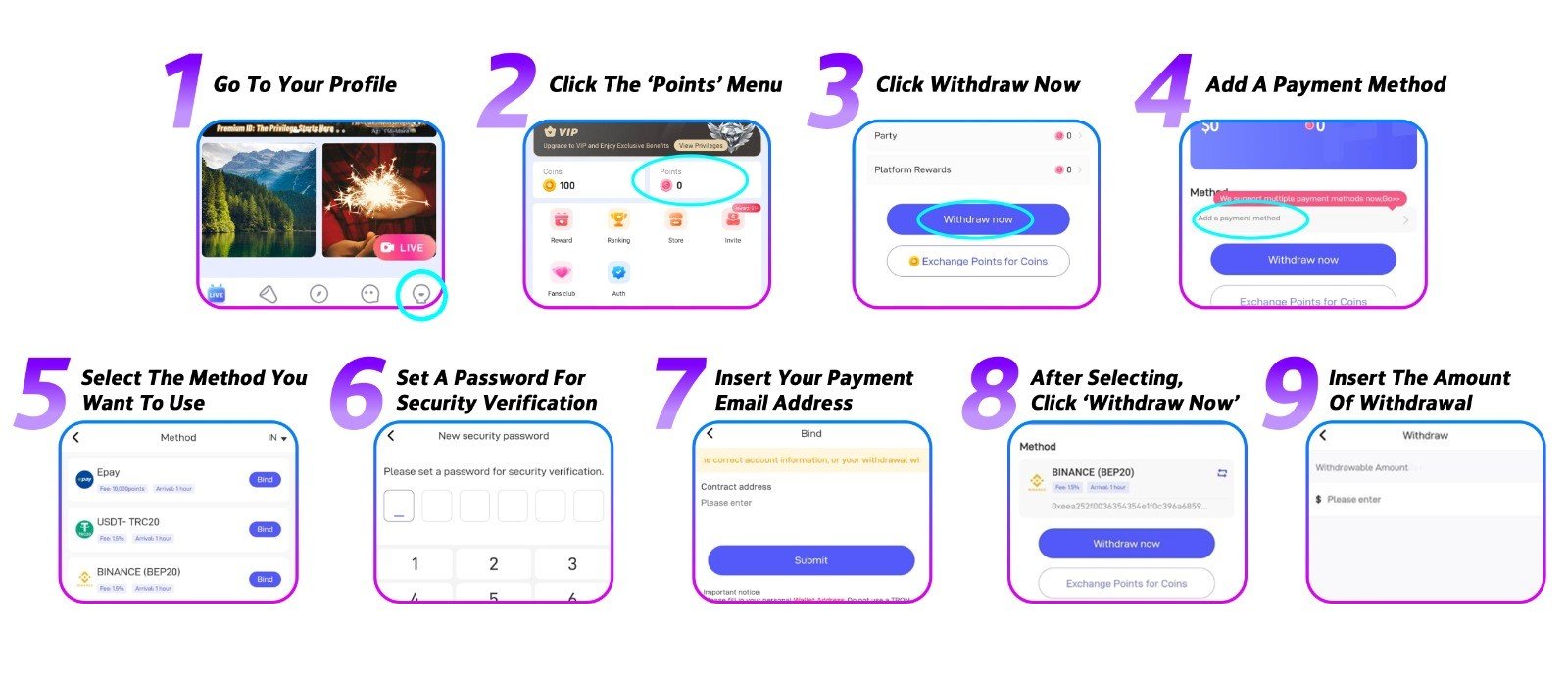
Step 1: Open Your Profile
First, launch the Poppo Live app and head to your profile.
Step 2: Go to the ‘Points’ Menu
Second, inside your profile, tap the ‘Points’ menu to view your available earnings.
Step 3: Tap ‘Withdraw Now’
Your current balance will be displayed here. Tap ‘Withdraw Now’ to move forward.
Step 4: Add a Payment Method
First-time withdrawal? You’ll need to set up a payment method first. Tap ‘Add a Payment Method’ to get started.
Step 5: Choose Your Payment Method
Poppo Live accepts Epay, USDT, PayPal, bank transfer, and e-wallet. Although, note that available options depend on your location.
Step 6: Set Up a Transaction PIN
Then, you’ll be required to create a PIN that will be used every time you withdraw. For example, choose something secure and avoid obvious combinations like 12345 or 11111.
Step 7: Enter Your Payout Email
Next, type in the email address tied to your payment account to link it to your Poppo Live profile.
Step 8: Return to ‘Points’ and Tap ‘Withdraw Now’
With your payment method set up, go back to the ‘Points’ menu and tap ‘Withdraw Now’ again.
Step 9: Enter and Confirm Your Amount
Lastly, type in how much you’d like to withdraw and confirm. Withdrawals are typically processed within 72 hours.
Frequently Asked Questions
- What’s the minimum I can withdraw?
Remember, the minimum is $10 USD, and all withdrawals must be in multiples of 10, such as $10, $20, $50, or $200. - Which payment methods are supported?
In general, Poppo Live supports Epay, USDT, PayPal, bank transfer, and e-wallet. However, available options vary by region, check the app for what’s supported in your area. - Are there any transaction fees?
This depends on the payment provider you use. Some third-party services charge a transfer fee, and rates vary. Also, check with your chosen provider before withdrawing. - Can hosts manage their own withdrawals?
Yes, hosts have full control over their payouts and can initiate a withdrawal at any time. - I linked the wrong payment account
No problem. You can unlink and update your payment details from your Poppo Live profile at any time, with no restrictions.
Poppo Live Withdrawal Common Issues
- Withdrawal failed
Possible causes include incorrect payment details, an inactive or suspended account, or a payment method that’s on our restriction list. Instead, try switching to a different method and contact our support team if the issue continues. - The withdraw button isn’t showing
This means at least one requirement hasn’t been met. In that case, confirm that your face verification is done, your contact details are verified, and your balance is at least $10 USD. - A payment method I want isn’t available
Some methods are limited to specific regions. In this case, choose from whatever options are visible and available for your location. - My withdrawal is taking too long
Standard processing takes up to three business days. So, if yours has been sitting longer than that, get in touch with our support team and we’ll follow up.
Build a Stable Income
In conclusion, once your enter your requirements and your payment method is ready, Poppo Live withdrawal process is quick and painless. So, whether you’re a host or an agent, accuracy is the key, double-check your details before hitting confirm. Still have questions? Our support team is here for you anytime, and our blog is full of tips and tutorials to help you along the way.