
Connecting with live streaming hosts has never been easier, and Poppo Live has led that trend since launching in 2022. Reaching audiences in over 180 countries, the app gives fans a direct channel to chat with broadcasters, play mini-games, and build a fun online communities. If you want to stand out in a busy chat room or help your favorite host grow, you will need to know your way around Poppo Live coins.
Understanding Poppo Live Coins and Points
To make the most of your time on the platform, it helps to understand how the app separates viewer currency from host earnings:
-
Poppo Live Coins: These are purchased by viewers. You use a Poppo Live coin balance to send gifts, enter games, and buy status upgrades.
-
Poppo Live Points: These are earned by hosts. When you gift a streamer using Poppo Live coins, those gifts convert into Points on their account. Points serve as the host’s income, which they can later exchange for cash payouts.
Learn more about how Poppo Live host work on this page.
Four Ways to Use Poppo Live Coins
Having a healthy balance of Poppo Live coins transforms how you engage with live content:
-
Show Direct Support: Sending virtual gifts during a stream lets you thank hosts for their hard work and talent in real time.
-
Clutch the Victory in PK Competitions: PK battles bring high energy to streams as two hosts face off in a timed contest. Sending gifts during these matches directly increases your chosen host’s points, helping them win the battle.
-
Stand Out with VIP Status: Want everyone in the stream to know who you are? Unlocking VIP status gives you colorful badges, special chat styles, and dramatic arrival animations whenever you enter a broadcast room.
-
Participate in Live Events: You can spend your Poppo Live coin funds to take part in interactive events and platform mini-games hosted throughout the week.
How to Get More Poppo Live Coins
Since coins are not handed out for free just by watching streams, topping up your account balance is necessary. You can load up using two official avenues:
Option A: Direct In-App Purchases
-
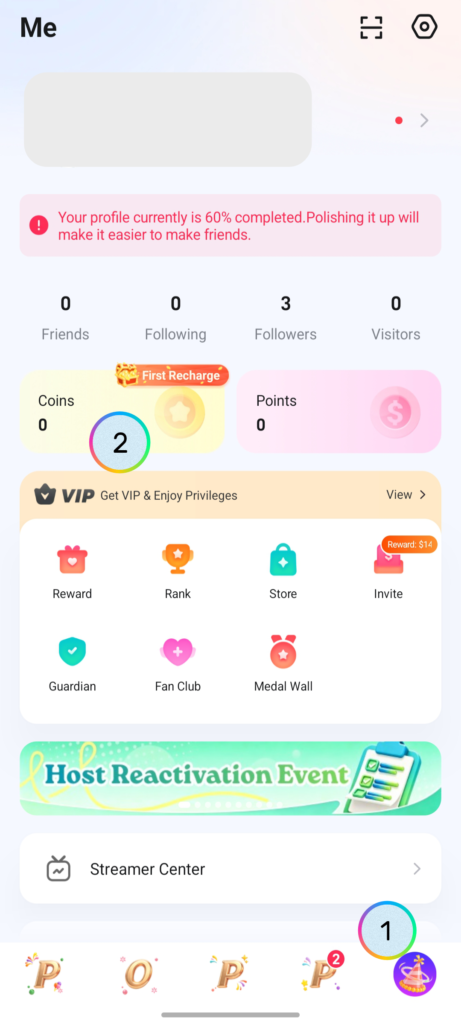
Launch the Poppo Live app and click on your Profile tab.
-
Tap on the Coins button to open the store.
-
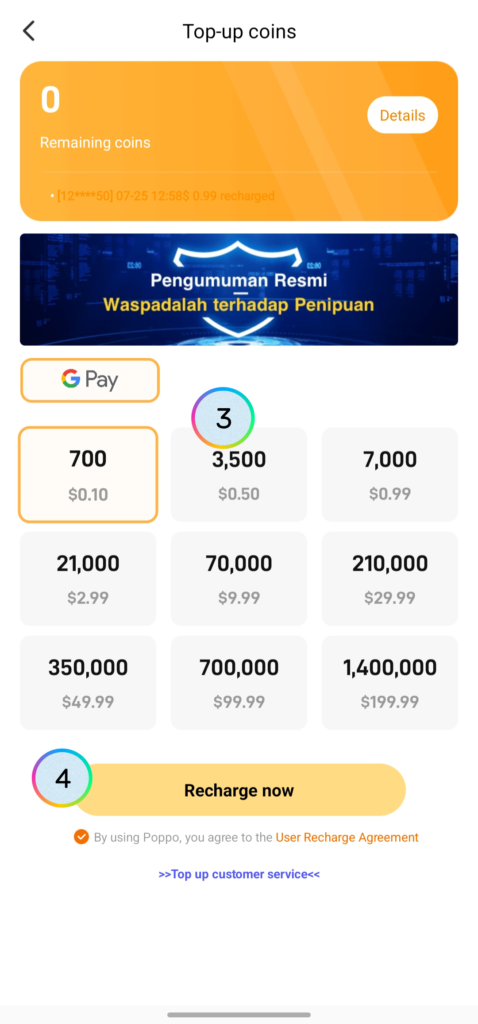
Choose how many Poppo Live coins you want to buy.
-
Finalize the payment through Google Pay or Apple Pay.
Option B: Third-Party Official Resellers
-
Find your personal User ID on your main profile screen under your username.
-
Look up a reputable, official Poppo Live reseller online.
-
Provide your User ID, pick your desired poppo live coins top-up amount, and pay using your preferred regional payment option.
Payment Speeds and Support Tips
Transactions are automated, so your Poppo Live coin balance generally updates within 1 to 5 minutes. Because in-app payments rely on the Apple App Store or Google Play Store, supported payment options (like credit cards or e-wallets) depend on where you live.
Should you ever encounter an issue where your top-up takes longer than 15 minutes, do not worry. Simply open your app, navigate to Profile > Help, and send a quick message to customer service along with your transaction receipt.
Conlusion
Grabbing some coins is the easiest way to start engaging with hosts, making your streams much more entertaining while helping hosts turn their passion into a career.
A potential career that any of you may join anytime and from anywhere! And with us as an official agency partner, registering as a livestream host on Poppo Live will earn you a full mentoring and guidance from our team! Contact our team right here.